AI-Powered Development
Platform for Your Team
Zero-trust code reviews, desktop chat, tool packs, and developer libraries. Your credentials, your GitHub App, your control.
intelligencex setup wizardThree Steps to Get Started
Begin with the reviewer, then branch into chat, tool packs, and local integrations when you need them.
Authenticate with YOUR Account
Use your existing ChatGPT or GitHub Copilot login. No API keys needed, no middleman. Your credentials go straight to the provider, stored as GitHub Actions secrets you control.
Set Up in Seconds
Run the CLI wizard or local web UI, choose a path (new setup, fix auth, cleanup, maintenance), run auto-detect preflight, then apply setup with guided defaults.
Run Reviews, Chat, or Local Automation
Start with reviewer automation in GitHub Actions, then expand into IX Chat, local tool packs, PowerShell scripting, or custom .NET integrations as your workflow grows.
7 Product Areas
Everything you need for AI-powered development workflows.
GitHub Actions Reviewer
Zero-trust PR reviews in GitHub Actions with ChatGPT or Copilot, structured findings, inline comments, hybrid summaries, and setup paths you control.
intelligencex setup wizard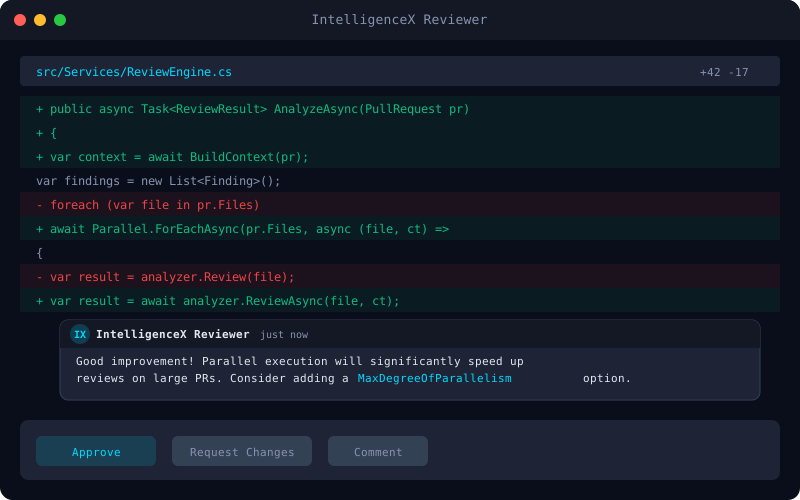
IX Chat
Windows tray app for local AI conversations with runtime switching, persistent threads, tool packs, and no IntelligenceX-hosted backend.
pwsh .\Build\Run-ChatApp.ps1 -Configuration Release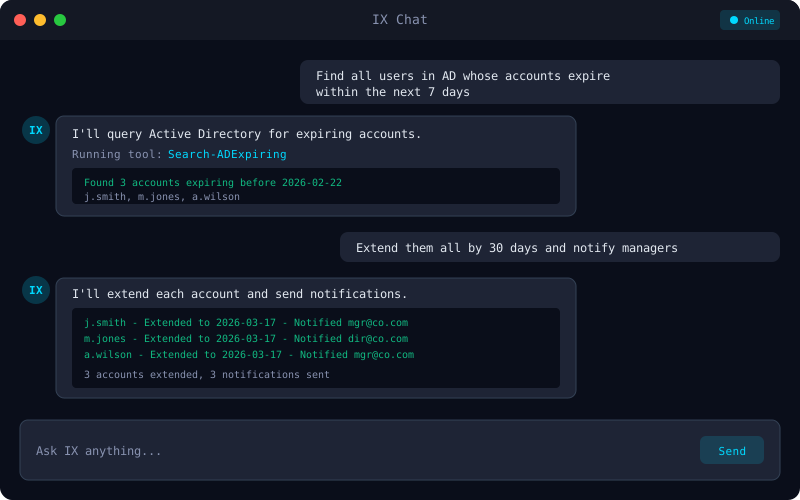
IX Tools
Tool packs for IX Chat and custom .NET integrations, with open-source packs in-repo and private or licensed packs available in supported environments.
intelligencex setup wizard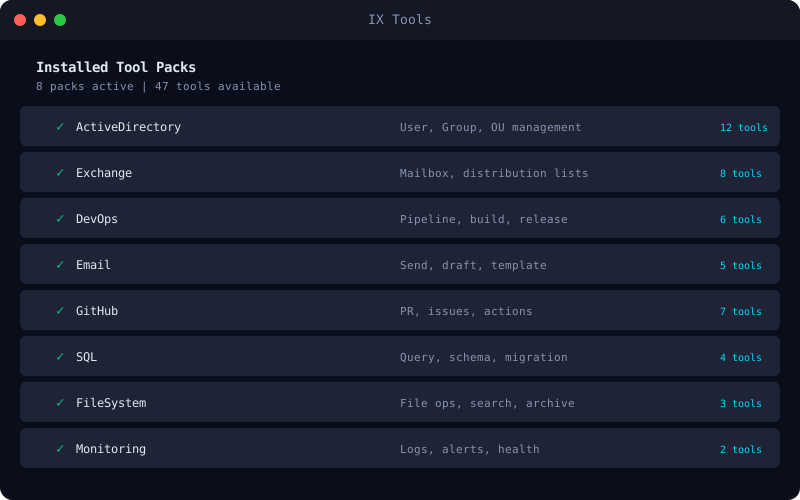
CLI Tools
CLI and local web flows for onboarding, auth, reviewer runs, analysis commands, maintenance, cleanup, and multi-repository setup.
dotnet run --project IntelligenceX.Cli/IntelligenceX.Cli.csproj -c Release -- setup wizard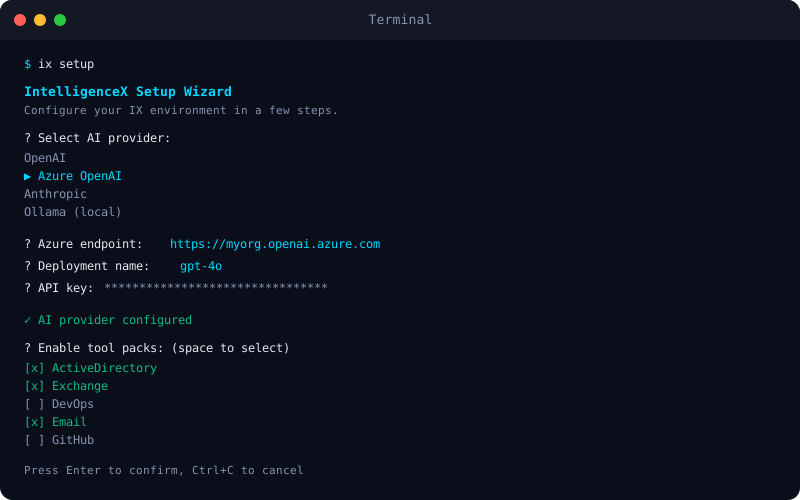
.NET Library
Native, compatible HTTP, Copilot, and app-server clients with tool calling and streaming for building your own IntelligenceX-powered apps.
dotnet add package IntelligenceX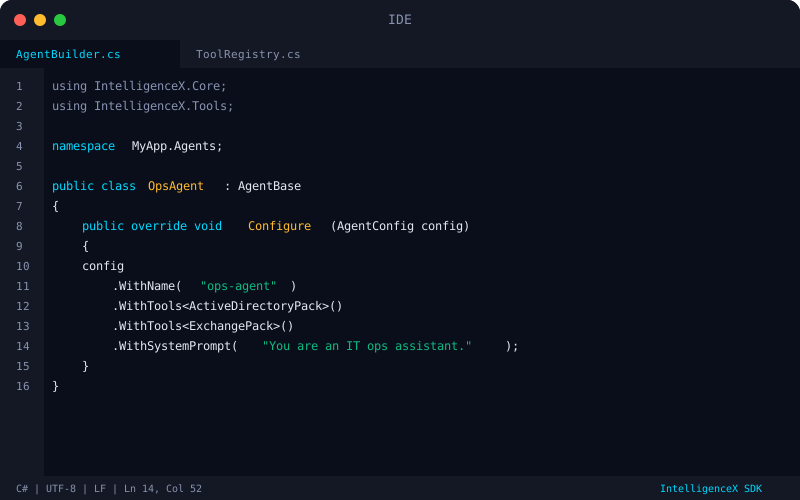
PowerShell Module
PowerShell cmdlets for chat, threads, config, MCP servers, diagnostics, and scriptable automation on top of the IntelligenceX runtime.
Install-Module IntelligenceX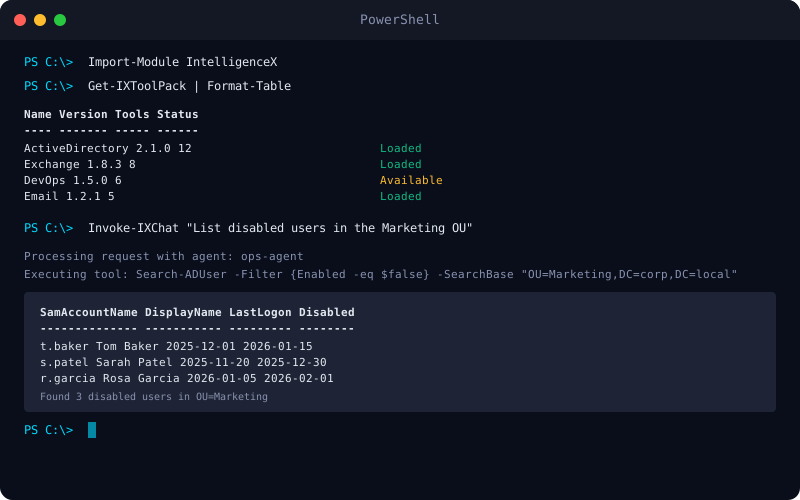
Issue Ops + Project Control
Maintainer-first GitHub Project workflows for issue and PR triage, confidence scoring, project field sync, and proposal-first backlog cleanup.
intelligencex todo project-bootstrap --repo owner/repo --owner owner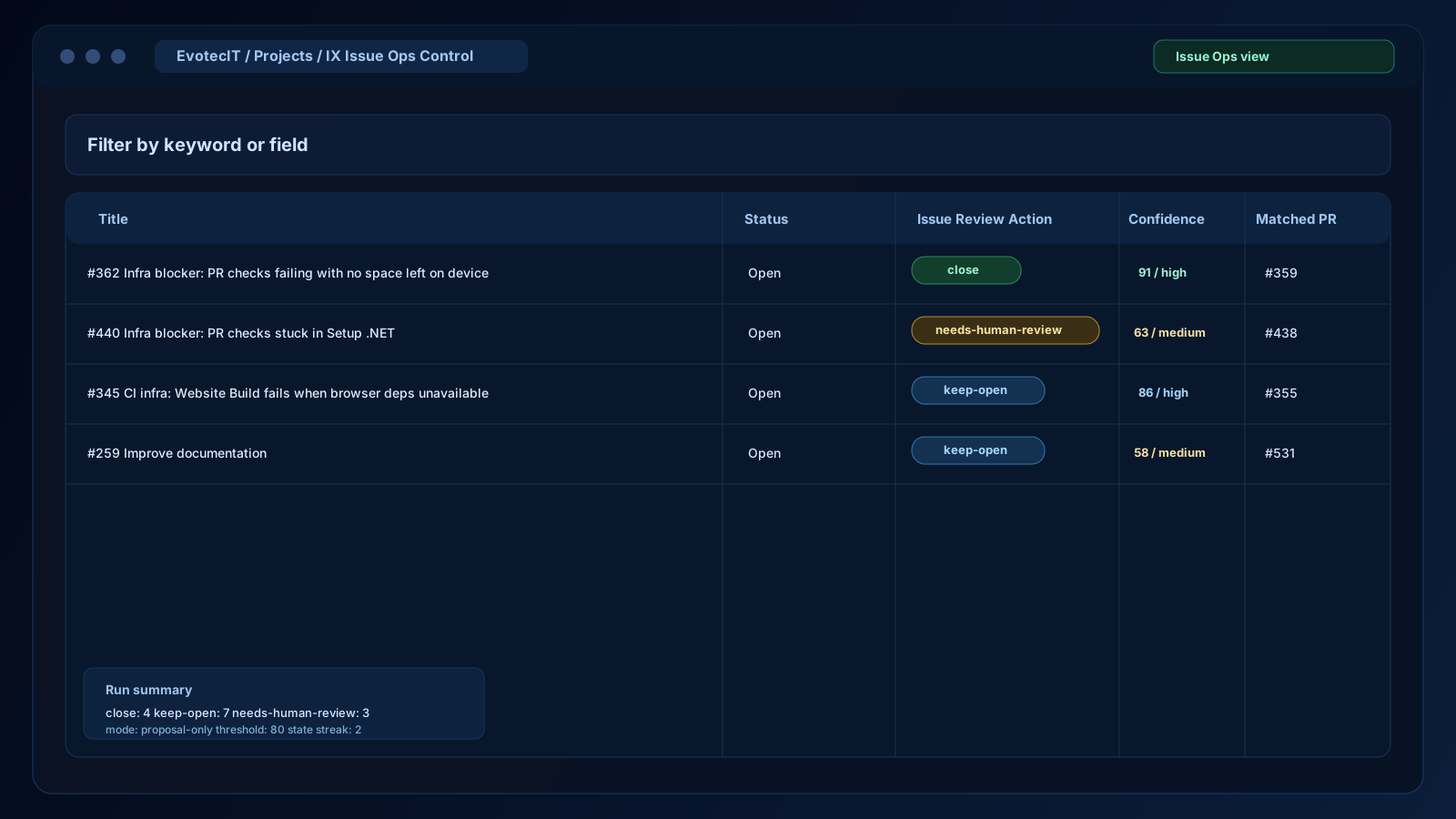
Multiple Ways to Use IntelligenceX
From GitHub Actions to C# and PowerShell.
# .github/workflows/review-intelligencex.yml
# Pinned SHA after @ = safer, reproducible workflow version.
jobs:
  review:
    uses: EvotecIT/IntelligenceX/.github/workflows/review-intelligencex-reusable.yml@
    with:
      reviewer_source: release
      openai_transport: native
      output_style: claude
      style: colorful
    secrets:
      INTELLIGENCEX_AUTH_B64: ${{ secrets.INTELLIGENCEX_AUTH_B64 }}
      INTELLIGENCEX_GITHUB_APP_ID: ${{ secrets.INTELLIGENCEX_GITHUB_APP_ID }}
      INTELLIGENCEX_GITHUB_APP_PRIVATE_KEY: ${{ secrets.INTELLIGENCEX_GITHUB_APP_PRIVATE_KEY }}
{
"review": {
"provider": "openai",
"model": "gpt-5.2-codex",
"mode": "hybrid",
"length": "long",
"outputStyle": "claude",
"reviewUsageSummary": false
}
}using IntelligenceX.OpenAI;
// One-liner - send a message and get a response
var result = await Easy.ChatAsync("Review this code for security issues");
Console.WriteLine(result.Text);
// Or use the full app-server client
var client = await AppServerClient.StartAsync(new AppServerOptions {
ExecutablePath = "codex",
Arguments = "app-server"
});
await client.InitializeAsync(new ClientInfo("MyApp", "Demo", "1.0.0"));
var thread = await client.StartThreadAsync("gpt-5.2-codex");
await client.StartTurnAsync(thread.Id, "Hello from IntelligenceX");# Import the module
Import-Module IntelligenceX
# Connect and send a message
$session = Connect-IntelligenceX -Diagnostics
Initialize-IntelligenceX
Start-IntelligenceXLogin
Wait-IntelligenceXLogin
$thread = Start-IntelligenceXThread -Model 'gpt-5.2-codex'
Send-IntelligenceXMessage -ThreadId $thread.Id -Content 'Analyze this'
Disconnect-IntelligenceXSee What You Can Build
Real-world examples of IntelligenceX in action.
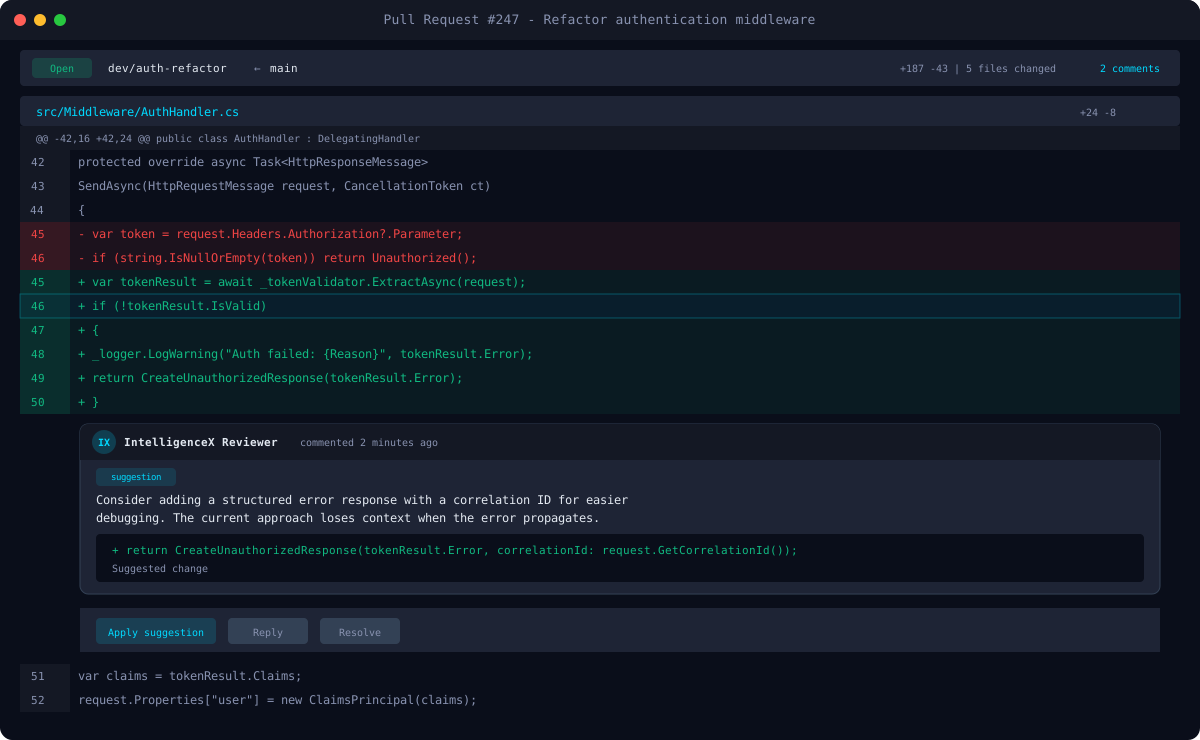
Inline PR Comments
The reviewer posts structured inline comments directly on changed lines, with severity levels and actionable suggestions.
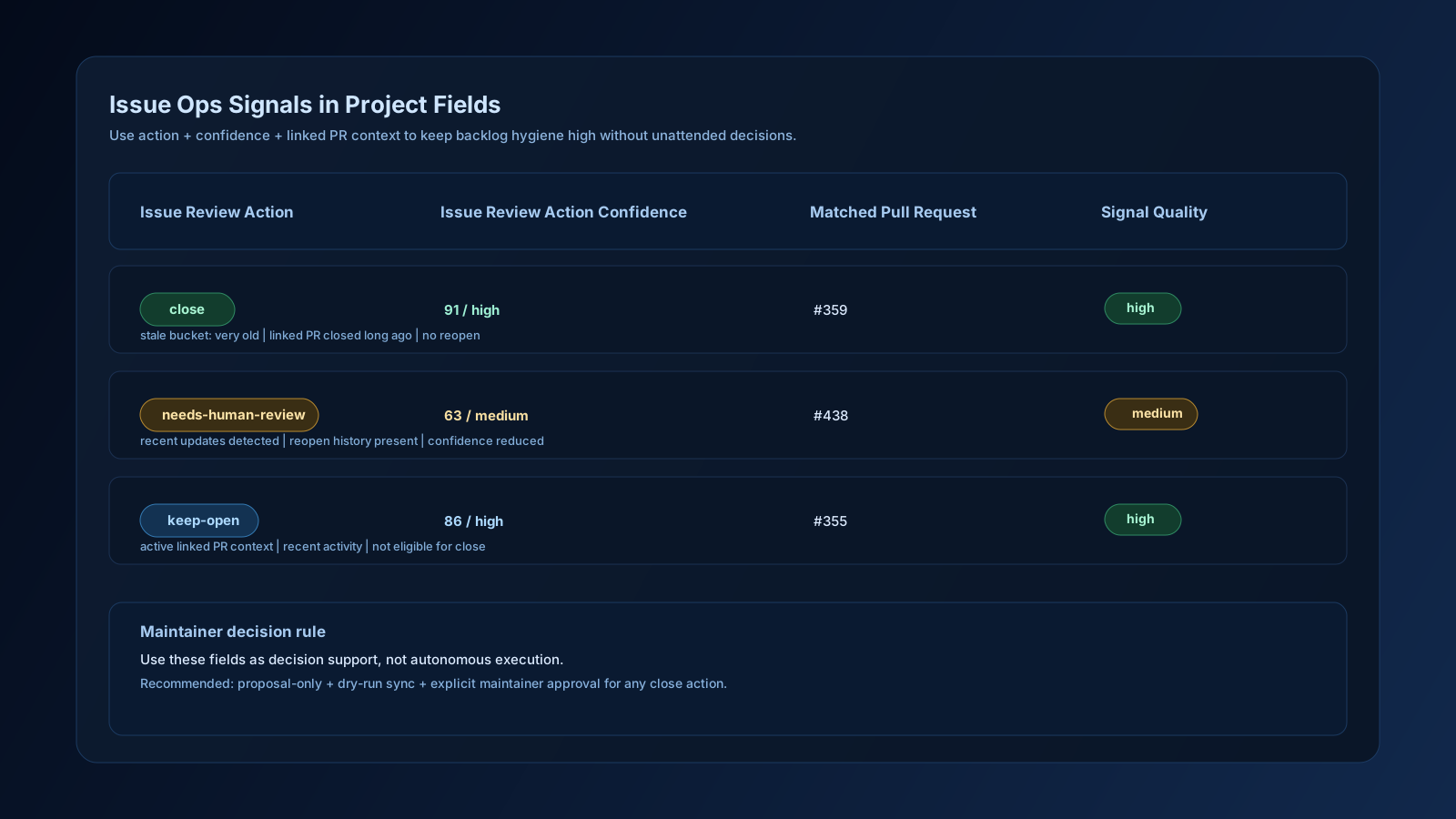
Issue Ops Project View
GitHub Project view for issue applicability triage with suggested action, confidence, and linked PR context for stale infra blockers.
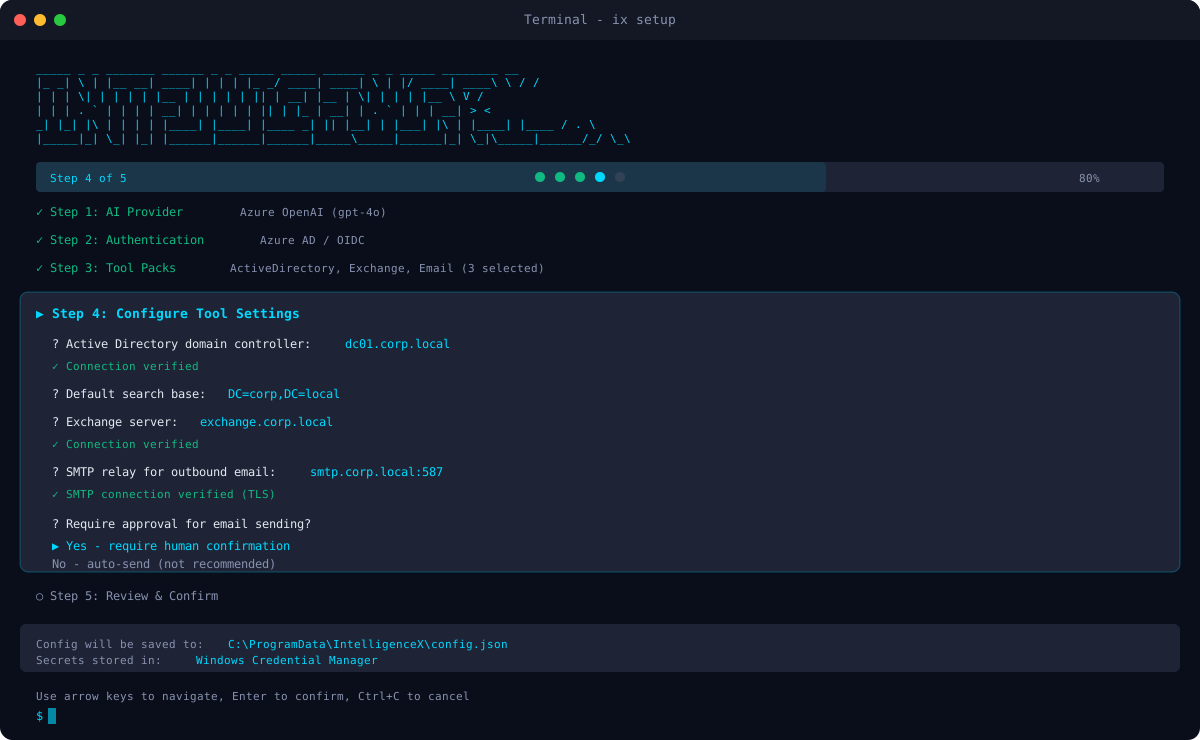
CLI Setup Wizard
Interactive wizard guides you through authentication, repo selection, and workflow generation in under a minute.
Frequently Asked Questions
Is my code safe? Do you see it?
IntelligenceX has no backend service. Your code diffs go directly from GitHub Actions to your chosen AI provider (ChatGPT or Copilot). We never see, store, or process your code.
Why do I use my own ChatGPT or Copilot login?
This is the zero-trust design. You authenticate with your own account. No shared API keys, no pooled quotas, no third-party billing. You control the credentials, stored in GitHub Actions secrets that only your workflows can access.
What is 'Bring Your Own GitHub App'?
Instead of trusting our GitHub App, you can create your own App under your organization. This gives you branded bot identity, fine-grained permissions, and full audit control. The CLI wizard supports this flow natively.
Which AI providers are supported?
ChatGPT (native transport via OAuth) and GitHub Copilot (via Copilot CLI). You configure the provider and model in .intelligencex/reviewer.json.
How do I get started?
Run 'intelligencex setup autodetect' first, then use 'intelligencex setup wizard' or 'intelligencex setup web'. Onboarding is path-first (new setup, fix auth, cleanup, maintenance) and runs entirely on your machine.
Can IntelligenceX detect what path I should take?
Yes. Auto-detect runs doctor-style checks (auth/config/GitHub access) and suggests a path before repo selection. It helps you choose between first-time setup, auth refresh, or maintenance.
How do cleanup and maintenance differ?
Cleanup removes workflow/config (and optionally secrets). Maintenance inspects current state first, then guides you to setup, update-secret, or cleanup depending on findings.
What platforms are supported?
Windows, macOS, and Linux. The CLI and library target .NET 8+ and .NET 10+, the PowerShell module supports netstandard2.0, net472, and net8.0. The reviewer runs on any GitHub Actions runner.
Can I customize the review behavior?
Yes. Choose from presets (balanced, picky, security, performance, tests, minimal) or write custom JSON config. Control review mode (inline, summary, hybrid), length, output style, and auto-resolve behavior.
Is this similar to Claude Code or Codex?
The reviewer produces structured, Codex-style output integrated into your GitHub PR workflow. It supports inline comments with code suggestions, summary reviews, and hybrid mode.
Ready to Get Started?
Set up AI-powered code reviews in under a minute. No backend, no API keys, just your own credentials.