Usage Reporting
IntelligenceX can build provider-neutral usage reports from local AI activity and GitHub contribution data. The reporting pipeline is designed for real developer machines where activity is often split across:
- the current Windows profile
- recovered
Windows.oldprofiles after reinstalls - live WSL home directories
- multiple local providers such as Codex, Claude, LM Studio, and Copilot CLI
- GitHub profiles where the visible work spans both the personal account and owned organizations
Quick Start
Generate a self-contained HTML report bundle:
intelligencex telemetry usage report `
  --out-dir artifacts\usage-report `
  --github-user PrzemyslawKlys `
  --recent-first `
  --max-artifacts 200
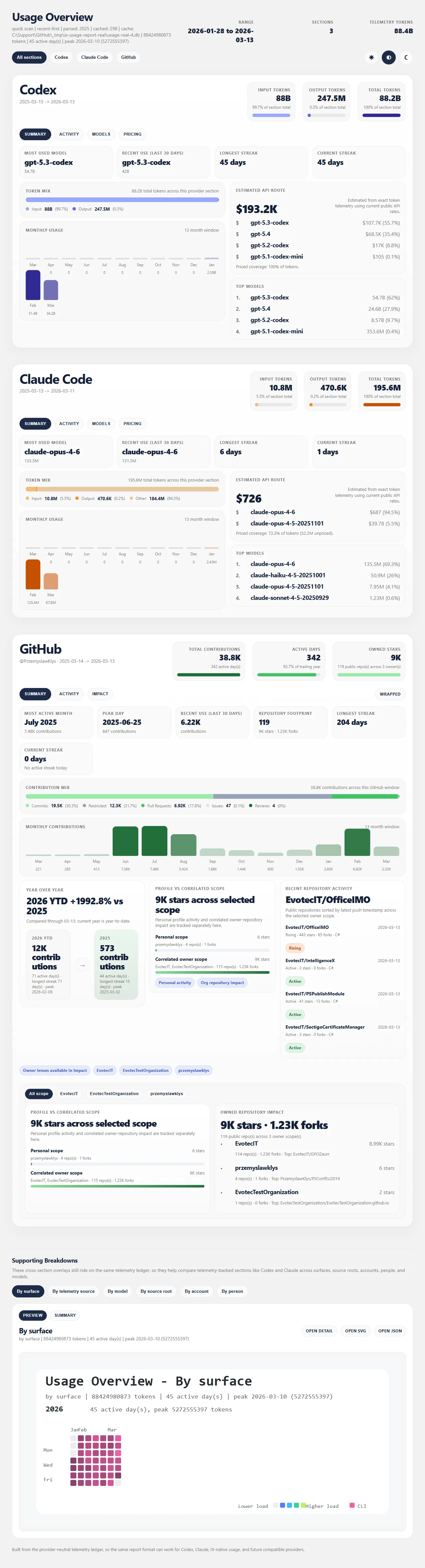
That writes a browsable bundle with:
index.htmloverview.json- provider charts such as
provider-codex.light.svg - supporting breakdown pages such as
source-root.htmlandtelemetry-source.html
What Gets Discovered By Default
telemetry usage report runs the quick-scan path and auto-discovers provider roots before rendering. On Windows, that discovery now includes:
- the current user profile
- recovered profiles under
X:\Windows.old\Users\* - live WSL distros discovered through
wsl.exe --list --quiet
Current default provider roots include:
- Codex:
~/.codex - Claude:
~/.claude/projectsand~/.config/claude/projects - LM Studio:
~/.lmstudio - GitHub Copilot CLI:
~/.copilot
The same profile expansion is applied to recovered Windows.old users and live WSL homes when those folders exist.
Add Extra Paths
You can include ad hoc restored or alternate folders immediately with --path . Repeat the flag to add more than one path in the same run.
intelligencex telemetry usage report `
  --path C:\Recovered\.codex `
  --path C:\Recovered\.lmstudio `
  --out-dir artifacts\usage-report
This is useful when you want to scan a manually restored profile or a provider root that does not live in the default home location.
Add GitHub Context
You can append GitHub analytics directly into the same report:
intelligencex telemetry usage report `
  --out-dir artifacts\usage-report `
  --github-user PrzemyslawKlys `
  --github-owner EvotecIT
--github-user adds the profile activity section and will try to correlate owned organization scope automatically when possible. --github-owner lets you add explicit owner or organization scope for repository-impact reporting. If you need to pass credentials explicitly, use --github-token , or rely on INTELLIGENCEX_GITHUB_TOKEN , GITHUB_TOKEN , GH_TOKEN , or an existing gh auth session.
Quick Scan vs Durable Import
The default report command uses a quick scan:
- fast bundle generation
- incremental raw-artifact cache reuse
--recent-firstsupport for large roots--max-artifactssupport so you can resume later
If you want to persist events into the telemetry database first, use the durable path:
intelligencex telemetry usage report `
  --db artifacts\usage.db `
  --out-dir artifacts\usage-report `
  --full-import
For repeatable dashboards, you can also keep a database warm with:
intelligencex telemetry usage overview `
  --db artifacts\usage.db `
  --out-dir artifacts\usage-overview `
  --discover `
  --recent-first `
  --max-artifacts 200
Filters
Common filters work across both report and overview :
--provider <id>--account <value>--person <value>--metric tokens|cost|duration|events--title <text>
Example:
intelligencex telemetry usage report `
  --provider codex `
  --person Przemek `
  --out-dir artifacts\codex-report
Copilot Notes
GitHub Copilot currently contributes local CLI activity from .copilot/session-state . That means IntelligenceX can include:
- Copilot CLI session activity
- local session durations
- turn counts and session identifiers
- the authenticated GitHub login from
.copilot/config.json
Treat that as a separate Copilot activity section, not a Claude-style token ledger. It is useful and worth surfacing on its own, but it is not yet the same as full model/token telemetry.
It can also append a GitHub-backed Copilot plan/quota snapshot when a GitHub token is available. That quota view is separate from local CLI activity and should be read as a status snapshot, not as full historical token telemetry.
When To Use Which Command
Use telemetry usage report when you want a fast, shareable HTML bundle from whatever is available on the machine right now.
Use telemetry usage overview when you want a database-backed workflow that can be refreshed repeatedly and filtered later without rescanning every source root.